Hey everyone, it’s Jake from your go-to UPS backup power station supplier, and today we’re diving into a question I get asked at least three times a week: Do UPS backup power stations actually need maintenance? UPS Backup Power Stations

I know, I know—when you drop thousands (or tens of thousands) on a UPS unit, the last thing you want to hear is that you have to budget for extra upkeep. A lot of folks I talk to think, “It’s a box that makes power when the grid goes out—what’s there to fix?” I get it. When I was new to this space (back in like, 2012, when I was just a sales rep hanging around a small trade show booth), I thought the same thing. Then we got a call from a local data center that had a UPS unit in for “emergency repairs” after a storm. The unit had sat unused for 18 months, and the internal batteries were so corroded that acid had leaked all over the wiring. They lost half their server stack during a 12-minute grid blip—nothing, in their experience, that should’ve caused a shutdown. That’s when it clicked: maintenance isn’t a “nice to have” for UPS systems—it’s the whole reason you bought the dang thing.
Let’s break this down like we’re talking over coffee (your choice, I’m partial to oat milk lattes, no judgment if it’s black). First, let’s get one thing straight: UPS backup power systems aren’t just big batteries sitting there waiting to wake up. They’re complex machines—sort of like a fancy car, but for electricity. You change the oil in your car every 5k miles to keep it from dying on the highway, right? Same logic here. A UPS has moving parts, chemical components, and electronics that all degrade over time, even if they never get turned on.
Now, let’s talk about what actually breaks when you skip maintenance. The biggest culprit? Batteries. These are the unsung heroes of any UPS unit. They’re the ones that kick in in 10 milliseconds flat when the grid drops—faster than you can blink, literally. Over time, battery cells self-discharge, corrode, and build up sulfate on the plates (that’s a chemical thing, don’t worry, I won’t bore you with the chemistry degree I never finished). If you don’t test them regularly, a dead or weak cell can drag down the whole system. Last year, a small manufacturing plant I worked with told me their UPS “never failed” in 10 years of use. Turns out, they’d never checked the batteries. When their grid went out last spring, only 2 of the 48 cells were working. They lost 3 hours of production, which cost them around $18k in lost orders and overtime for their night shift. That’s the kind of hit that makes “saving” on maintenance feel super expensive.
Then there’s the cooling system. UPS units run hot—like, really hot, especially the bigger ones for data centers or industrial facilities. Most have fans or heat sinks that keep the electronics from overheating. Dust, lint, and even tiny bugs (don’t laugh, I’ve seen a wasp nest clog a fan) can build up in those cooling parts over months. If the cooling system fails, the UPS can go into “thermal shutdown”—it’ll turn itself off to keep from catching fire. That’s a worst-case scenario no one wants to deal with, especially if it happens during a grid outage. I once got a panic call from a grocery store chain’s maintenance team after their new UPS unit shut down during a thunderstorm. Turns out, the air filter had never been changed, so the unit overheated mid-test. They had to rent a temporary generator for the weekend, which cost them $5k—way more than a few filter changes would’ve been.
Electrical connections are another big one. Vibration from being turned on and off (or from the unit itself running) can loosen bolts and wires over time. If a connection is loose, it can cause arcing—basically, tiny sparks that can damage parts or start a fire. I’ve seen units where a loose wire almost fried the control board, which would’ve cost $20k to replace. Regular maintenance includes tightening those connections, checking for frayed wires, and making sure everything is sitting where it’s supposed to. And let’s not forget the control software. A lot of modern UPS systems have built-in software that monitors performance, schedules tests, and alerts you to issues. But if you never update that software, it can become glitched—so it might not send you an alert when a battery is dying, or it might fail to switch over when the grid drops. It’s like using a smartphone running a 5-year-old version of iOS—sure, it works, but it’s not reliable.
Wait, but hold on—isn’t there a difference between small, home/office UPS units (like the ones you plug your laptop into) and the big commercial/industrial UPS stations we sell? Yeah, that’s a fair question. The small ones you can pick up at Best Buy? They’re pretty low-maintenance—most just need the batteries replaced every 3-5 years, and you can do that yourself. But the big UPS backup power stations we supply—for data centers, hospitals, manufacturing plants, even airports? They’re a whole different beast. They’re designed to run for 15+ years, but only if you take care of them. I always tell our clients: a $500 maintenance plan is nothing compared to the cost of downtime.
Let’s put some numbers to it, because people love numbers. The average cost of downtime for a data center is around $9,000 per minute. For a hospital, it’s even higher—if the emergency power fails, that’s a life safety issue, not just lost revenue. For a manufacturing plant, it’s usually between $10,000 and $100,000 per hour, depending on what they’re making. A typical maintenance plan for a medium-sized UPS unit runs about 1-2% of the unit’s cost per year. Let’s say you have a $100k UPS—your annual maintenance is $1k to $2k. That’s way cheaper than the average downtime hit if something goes wrong. Last quarter, we had a client who skipped maintenance for two years. Their UPS had a minor battery issue that a $100 test would’ve caught early, but it turned into a full system failure during a storm. They had to rent a temporary generator for a week, which cost them $70k. Ouch.
Now, I know what some of you are thinking: “Can’t I just test the UPS myself?” Sure, you can run a basic test by simulating a grid outage (most units have a test button). But here’s the thing: those basic tests only check if the unit turns on. They don’t check the individual battery cells, the cooling system’s airflow, the tightness of electrical connections, or the software’s latest updates. We’ve had clients come to us after doing their own tests and thinking everything was fine, only to find half their batteries were dead when we did a full inspection. It’s like checking your car’s oil level with the dipstick and thinking that’s all you need—you still need to get tune-ups, tire rotations, etc.
So what does regular UPS maintenance actually look like, anyway? For our commercial units, we usually recommend a quarterly inspection and a full annual service. The quarterly stuff is simple: we check the battery voltages, run a quick load test, clean the air filters, and make sure the cooling fans are working. The annual service is more in-depth: we test every individual battery cell (that’s the part where we catch weak ones before they die), tighten all electrical connections, update the control software, inspect the cooling system for damage, and do a full load test to make sure the unit can handle its rated power. We also keep detailed records of all maintenance, which is super useful for compliance—hospitals and data centers have to keep documentation for regulatory purposes, and we make that easy.
Wait, but what about warranty? A lot of clients ask: “If I don’t do maintenance, will my warranty be void?” The short answer is: yes, most warranties require regular maintenance to be valid. We’ve had a client whose UPS failed after 3 years, and when they filed a warranty claim, the manufacturer asked for maintenance records. They had zero, so the claim was denied. They ended up paying $30k for a replacement unit. That’s a huge waste of money, all because they skipped a few service calls.
Now, let’s get real— I’m a supplier, not a salesman trying to push unnecessary stuff. I’ve been in this long enough to know that the clients who take maintenance seriously are the ones who stay with us for 10+ years, and they’re the ones who never have to deal with a crisis when they don’t need to. The ones who skip it? They come back once, after something breaks, and then we never hear from them again—either because they got burned too bad, or because their whole operation shut down and they can’t afford a new UPS for a while.
I get it, budgets are tight. A lot of small businesses or new facilities are stretching every dollar, and maintenance feels like an extra cost they can put off. But here’s the thing: when the grid goes out, you need your UPS to work. There’s no do-over. A storm doesn’t wait a month while you figure out your budget. A power blip during peak hours doesn’t pause while you order new parts. If your UPS is your safety net, maintenance is the thing that makes sure that net doesn’t have holes.
So if you’re reading this and you’re in charge of a UPS system—whether it’s a small one for a doctor’s office or a big one for a warehouse—do yourself a favor: don’t wait until something breaks. Schedule a maintenance check, even if it’s just a basic one, or reach out to our team to talk about a plan that works for your needs. We don’t do one-size-fits-all here—every facility is different, and we’ll work with you to make a maintenance plan that fits your budget and your equipment.
At the end of the day, UPS backup power stations are investments. You buy them to protect your business, your patients, your data, whatever matters most. But an investment that isn’t maintained isn’t an investment—it’s a paperweight that only works when you don’t need it. Don’t be that person.
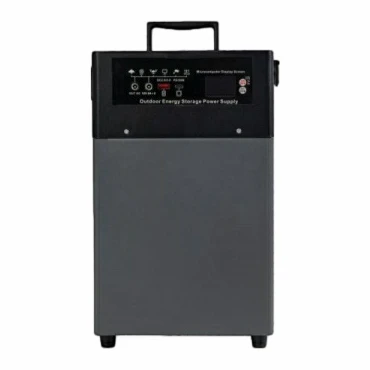
If you’re ready to chat about maintenance plans, need an inspection, or just have questions about keeping your UPS running smooth, hit us up. We’re here to help, no pressure, just real talk about keeping your power on when it counts.
Small Portable Power Stations 100W–600W References:
- U.S. Department of Energy, "Backup Power Systems for Commercial Facilities," 2022
- International Society of Automation, "UPS Maintenance Best Practices," 2021
- Electric Power Research Institute, "Cost of Downtime for Industrial and Commercial Operations," 2023
- Battery University, "Lead-Acid Battery Maintenance for UPS Applications," 2022
Guangdong Joinwin Global Digital Intelligence Technology Co., Ltd.
As one of the most professional UPS backup power stations manufacturers in China, we have world-leading production equipment and strong manufacturing capabilities. Please rest assured to buy high quality UPS backup power stations from our factory. Customized orders are welcome.
Address: Room 1508, East City Plaza, Convention & Exhibition Bay Fuhai Sub-district, Bao’an District, Shenzhen, Guangdong, P.R. China
E-mail: bruceyang@joinwinenergy.com
WebSite: https://www.joinwinpower.com/
